The Real Work of Building Better Agents
Agent quality is not just choosing a smarter model. It is controlling context, routing, memory, deterministic work, and uncertainty.
By Kenny Trinh and Kira
It is not just choosing a smarter model. It is controlling context, routing, memory, deterministic work, and uncertainty.
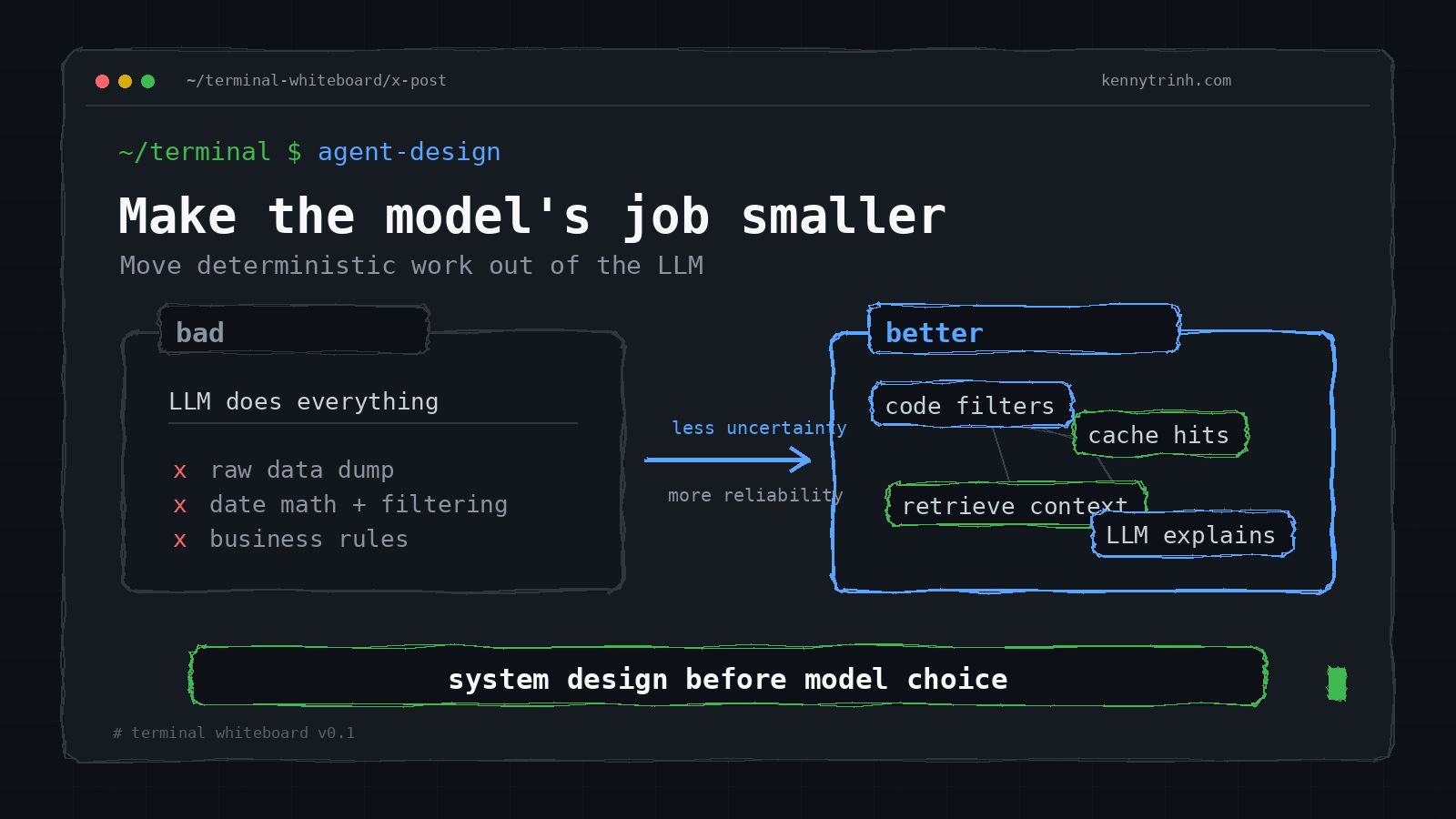
When an agent fails, the lazy question is:
Which smarter model should I use?
Sometimes that is the right question. But in production, it is usually not the first one.
The better question is:
What part of the system made the model’s job harder than it needed to be?
Was the context too noisy? Was the task too ambiguous? Did we ask the model to do date math, filtering, permission checks, and business rules that deterministic code could have handled? Did we route every request to the most expensive reasoning model? Did we add five sub-agents when the real problem was bad context?
After an agent eval, the failure is rarely just “the model was not smart enough.” It may be cost, latency, context quality, task difficulty, routing, memory, tool design, or reliability.
That is the real work of building better agents: not making the model bigger, but making the model’s job smaller, clearer, and more constrained.
A bigger model is often the lazy solution. Better system design is the scalable one.
Agents are a spectrum
People use the word “agent” as if it describes one architecture. It does not.
An agent can be as simple as an LLM answering with relevant documents, or as complex as an autonomous coding system that loops through tools until it finishes a task.
A useful spectrum looks like this:
| Type | What it means | Example |
|---|---|---|
| Retrieval agent | LLM plus relevant context | “Answer using these docs” |
| Tool-use agent | LLM can call tools | Search, database, calculator |
| Workflow agent | LLM follows or coordinates a defined workflow | Planner → researcher → writer |
| Autonomous agent | LLM loops through tools until done | Coding agents, Claude Code-style workflows |
This distinction matters because teams often overbuild. They jump straight to workflow agents or autonomous loops when a retrieval agent or a simple tool-use agent would have solved the problem more reliably.
A good default is:
Use the weakest agent architecture that can reliably solve the task.
Autonomy increases capability, but it also increases uncertainty. Every additional step is another chance for the system to drift, call the wrong tool, use stale context, or make an inconsistent assumption.
Agent design is economics plus reliability engineering
Every agent system is balancing three goals:
- Quality
- Cost
- Latency
You rarely improve all three by accident.
A reasoning model may improve quality, but it costs more and responds slower. An autonomous loop may solve harder tasks, but token usage can explode. Edge models are fast, but lower quality. Parallel sub-agents may reduce wall-clock time, but they introduce coordination complexity.
A demo can use the strongest reasoning model for everything. A product cannot.
In production, you are not just asking, “Can the model answer?”
You are asking:
- Can it answer within the latency budget?
- Can it answer within the cost budget?
- Can it answer reliably across many edge cases?
- Can I debug it when it fails?
That is why the most useful agent optimization work usually falls into three buckets:
- Cheaper: reduce unnecessary tokens, unnecessary agents, and unnecessary expensive models.
- Faster: reduce pipeline steps, route simple requests away from heavy reasoning, and parallelize independent work.
- Smarter: improve context quality, reduce ambiguity, compress memory, and do deterministic work before the LLM.
The cost formula is simple, but brutal
A simple way to think about token cost is:
Token cost = number of tokens × model type × number of model calls
There are three multipliers:
- How much context you send.
- How expensive the model is.
- How many times you call models or agents.
Many teams optimize only the first one. They spend time trimming prompts while still sending every request to an expensive reasoning model.
But model type is often the biggest cost driver. A 3,000-token prompt to a cheap model may cost less than a 500-token prompt to a premium reasoning model.
The better order of operations is:
- Can I avoid the LLM call entirely?
- Can I use deterministic code?
- Can I use cache?
- Can I use a small model?
- Only then, do I need a reasoning model?
This is the logic behind routing. Simple tasks should not pay the cost of hard tasks.
Progressive disclosure for context
Progressive disclosure is usually discussed as a UI principle: do not show users everything upfront. Show what matters when it matters.
Agent systems need the same principle for context.
The bad version is to put every tool, every schema, every instruction, and every document into the system prompt.
The better version is to start with minimal context and load the relevant context only when needed. This is the same instinct behind the Advisor Chain pattern I explored in AI Tools Calling: retrieve only what is needed, instead of injecting all available context upfront.
For example, instead of giving an agent 80 tools, first classify the task:
- Is this a calendar task?
- Is this a coding task?
- Is this a support task?
- Is this a billing task?
Then load only the relevant tool group.
Every irrelevant token competes with relevant tokens. It does not just increase cost and latency. It can make the model worse by adding noise.
More context is not automatically better. I wrote about this retrieval failure mode before in Needles in a Haystack, but the production lesson is simple: the goal is minimum sufficient context.
Good context is:
- Relevant
- Fresh
- Structured
- Task-specific
- Compact
- Unambiguous
- Easy to scan
A large context window full of junk is not intelligence. It is just a bigger haystack.
Context engineering beats prompt engineering
Prompt engineering is about wording instructions.
Context engineering is about designing everything the model sees:
- System prompt
- Tool schemas
- Retrieved documents
- User history
- Current task data
- Intermediate state
- Output format
- Memory summaries
Prompt engineering helps when the task is already well-framed. It can improve instruction following. It can make outputs more consistent. It can help with formatting, examples, and constraints.
But prompt engineering does not fix missing data, bad retrieval, noisy context, ambiguous state, weak tool design, or a pipeline that asks the model to solve the wrong problem.
The model is only as good as the working memory you give it.
That is why context engineering is usually the deeper skill.
Do deterministic work before the LLM
A simple weather example shows the pattern.
Suppose the user asks:
How was the weather yesterday?
And the context contains a weekly forecast:
Mon 23: Partly Cloudy 26–34°C H65% R10%
Tue 24: Sunny 27–35°C H60% R5%
Wed 25: Storm 25–31°C H80% R70%
If today is Tuesday, the model has to resolve “yesterday” to Monday, search the rows, and answer.
That is not hard for a human. But in a production system, every extra reasoning step is a failure point.
A better version adds labels before the model sees the data:
Mon 23 — yesterday: Partly Cloudy 26–34°C H65% R10%
Tue 24 — today: Sunny 27–35°C H60% R5%
Wed 25 — tomorrow: Storm 25–31°C H80% R70%
An even better version filters the exact row in code:
Location: Ho Chi Minh City
Yesterday: Partly Cloudy 26–34°C H65% R10%
Now the model does not need to perform date math or search through the week. It only needs to communicate the answer.
This is the general rule:
Do deterministic work before handing the task to the LLM.
Use code for:
- Date math
- Filtering
- Sorting
- Counting
- Unit conversion
- Deduplication
- Permission checks
- Data joins
- Exact matching
- Business rules
Use the LLM for:
- Language understanding
- Explanation
- Judgment
- Synthesis
- Ambiguity that cannot be resolved in code
- User-facing communication
Bad architecture gives raw data to the LLM and asks it to figure everything out.
Better architecture prepares the exact data and asks the LLM to interpret and communicate it.
Memory is not chat history
Conversation history is not memory. It is raw logs.
Raw logs are expensive, noisy, and often redundant. They contain corrections, dead ends, repeated instructions, stale plans, and half-finished context. Replaying all of that back to the model is not the same as giving it memory.
Different memory strategies have different failure modes.
A sliding window keeps only the last N turns. This is simple and cheap, but the agent forgets important early constraints.
Recursive summarization compresses older conversation into summaries. This helps continuity, but it can drop important nuance or exact details.
RAG-based memory stores past dialogue as searchable chunks. This is useful for long histories, but retrieval can miss the memory that actually matters.
Hierarchical memory is usually better for long-running assistants:
- Recent turns: full detail
- Session summary: medium detail
- Long-term memory: compressed facts
- Project state: structured decisions and open tasks
- Raw logs: available only when needed
The deeper principle is:
Memory should decay in detail, not disappear.
For long-term AI assistants, you probably need a memory pyramid, not just a vector database.
For example:
Raw events
→ daily summaries
→ weekly summaries
→ monthly summaries
→ structured user state
→ query-specific retrieval
→ LLM synthesis
This matters for questions like:
What changed in my behavior this month?
That is not a simple semantic lookup. It requires aggregation, comparison, and pattern detection. The system should not stuff a year of raw activity into one model call. It should prepare a compact comparison, then let the LLM explain it.
Compress context before summarizing it
When context is too large, people often jump straight to lossy summarization. That can work, but it is not always the first move.
There are two kinds of compression:
Lossy compression removes detail. Summaries and extracted key facts are lossy. They are useful when you need the gist, but they can drop details that matter later.
Lossless compression preserves the same information in fewer tokens. For example, verbose JSON can often become compact rows. Repeated patterns can become ranges.
Raw JSON may be great for APIs, but it is not always the best format for an LLM.
This:
{
  "location": "Ho Chi Minh City",
  "forecast": [
    {
      "date": "2026-02-23",
      "day": "Mon",
      "condition": "Partly Cloudy",
      "high": 34,
      "low": 26,
      "humidity": 65,
      "rain": 10
    }
  ]
}
can become:
Location: Ho Chi Minh City
Mon 23: Partly Cloudy 26–34°C H65% R10%
The second version is cheaper, easier to scan, and often easier for the model to use.
Compression can also make patterns more visible.
Instead of:
Dec 1: Sunny, 34°C
Dec 2: Sunny, 34°C
Dec 3: Sunny, 34°C
...
Dec 15: Sunny, 34°C
use:
Dec 1–15: Sunny, 34°C
This is not just token savings. It makes the pattern obvious.
Optimize wall-clock latency, not just model latency
When users complain that an agent is slow, the model may not be the bottleneck.
Latency often comes from the whole pipeline:
- Speech-to-text
- Retrieval
- Tool calls
- Database queries
- Long prompt prefill
- Multiple agent hops
- Long output generation
- Text-to-speech
A model call that takes one second does not matter if retrieval takes three seconds.
Voice agents make this especially obvious. A text chatbot may feel acceptable at five seconds. A voice agent feels broken at five seconds.
Typical voice pipeline:
User audio
→ speech-to-text
→ LLM
→ text-to-speech
→ audio playback
Each step adds latency.
Good voice systems reduce perceived latency as much as actual latency:
- Stream partial speech-to-text.
- Start the LLM before the full transcript when safe.
- Stream LLM output.
- Start text-to-speech before the full answer is complete.
- Use smaller models for simple intents.
- Cache common answers.
- Avoid unnecessary tool calls.
- Handle interruptions naturally.
For voice, the product bar is brutal. If the system does not respond like a human conversation, users feel the latency immediately.
Route simple tasks away from expensive reasoning
Not every input needs “ultrathink very deep about this.”
A production agent should behave more like a traffic controller:
Input
→ classify intent
→ choose data
→ choose tool
→ choose model
→ generate response
Different requests deserve different paths:
| User request | Better route |
|---|---|
| “What is my account balance?” | Deterministic database query |
| “Summarize this page” | Small/fast model |
| “Debug this distributed system issue” | Reasoning model |
| “What did I ask last week?” | Memory retrieval |
| “Cancel my subscription” | Tool call with confirmation |
The point is not to avoid reasoning models. The point is to use them where they matter.
A coding agent pipeline might look like:
Classify request              → small model
Inspect files                 → deterministic search
Propose plan                  → medium model
Make architectural fix         → reasoning model
Format final response          → small model
Use expensive reasoning at the bottleneck of uncertainty, not for classification, formatting, extraction, or simple routing.
Sub-agents are workers, not independent CEOs
Sub-agents can help, but they are not magic.
The reliability math is sobering. If each agent step is 90% reliable:
1 step  = 90%
2 steps = 81%
3 steps = 73%
5 steps = 59%
Every agent step is another chance to fail.
More agents can mean more capability, but it can also mean:
- More coordination failures
- More inconsistent assumptions
- More state bugs
- More tool misuse
- More latency
- More cost
- More debugging complexity
Sub-agents are useful when work is independent, parallel, or specialized.
Good candidates:
- Search docs
- Search codebase
- Search logs
- Search past tickets
- Compare vendors
- Generate multiple candidate solutions
Bad candidates:
- Step B needs Step A’s output
- Agents modify shared state
- Agents depend on each other’s decisions
- The real issue is a bad prompt or bad context
Parallelism helps when the work is independent. If research docs takes five seconds, issue search takes four seconds, and log analysis takes six seconds, doing them sequentially takes fifteen seconds. Doing them in parallel takes roughly six seconds.
But the orchestrator must own state.
The orchestrator should decide:
- Who gets called
- What context they receive
- What tools they can use
- How outputs are merged
- What state changes are allowed
Sub-agents should be workers, not independent CEOs.
Consensus helps only when errors are independent
Majority vote can improve reliability. If each agent has independent 90% reliability, then three agents with majority vote can outperform one agent.
But the keyword is independent.
In real LLM systems, errors are often correlated. If every agent uses the same model, sees the same misleading context, shares the same weak prompt, and lacks the same missing data, they may all make the same mistake.
Majority vote does not fix shared blind spots.
Consensus is most useful when agents have genuinely different perspectives:
- Different retrieval sources
- Different prompts
- Different models
- Different reasoning strategies
- Different tools
Otherwise, you are often just paying more for the same failure.
Measure the failure mode before optimizing
A useful lesson from agent work is: do not guess the bottleneck.
One example from a category extraction task: the goal was to read Finnish store descriptions and output related store categories for SEO linking.
The Finnish prompt extracted only one or two categories. The English version extracted five or six.
A tempting fix was to increase temperature. That made output less consistent, but it did not solve the problem.
A better solution was to keep the instruction in English while asking for the output in Finnish:
System: I will give you a brand description and desired language.
Return categories in that language only.

User:
Description: {text}
Language: Finnish
The failure was not creativity. It was instruction-following quality under a specific prompt framing.
That is the larger point: measure the failure mode before optimizing.
Do not build complex memory, routing, or sub-agent systems because they sound impressive. Build them when traces show the need.
Interview users. Look at production failures. Trace the pipeline. Find the next most frequent or most expensive failure. Fix that.
Agent optimization should be data-driven, not architecture-driven.
A practical hierarchy for better agents
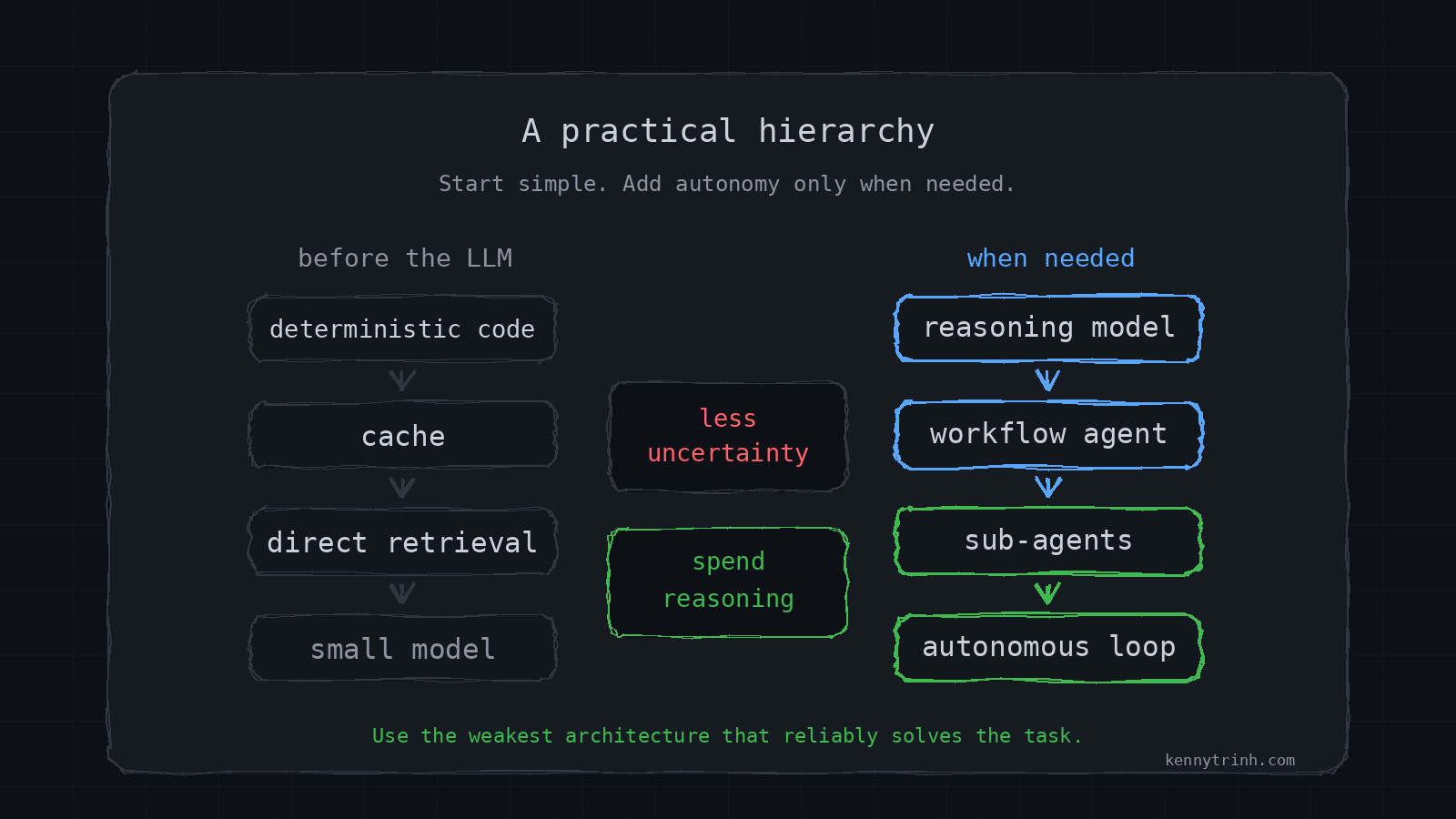
Before adding autonomy, walk down this hierarchy:
- Can this be deterministic code?
- Can this be cached?
- Can this be retrieved directly?
- Can this be handled by a small model?
- Does this need a reasoning model?
- Does this need a workflow agent?
- Does this need sub-agents?
- Does this need an autonomous loop?
This hierarchy prevents one of the most common mistakes in agent design: starting with workflow automation or autonomy before exhausting simpler system design.
The best agent systems do not ask the LLM to do everything. They use the LLM for the exact work only it can do.
The scalable path is not “use the smartest model everywhere.”
It is to reduce uncertainty before the model is called:
- Route the request.
- Compress the context.
- Retrieve only what matters.
- Resolve ambiguity with code.
- Use deterministic systems for deterministic work.
- Reserve expensive reasoning for the parts where reasoning is actually needed.
That is the real work of building better agents.